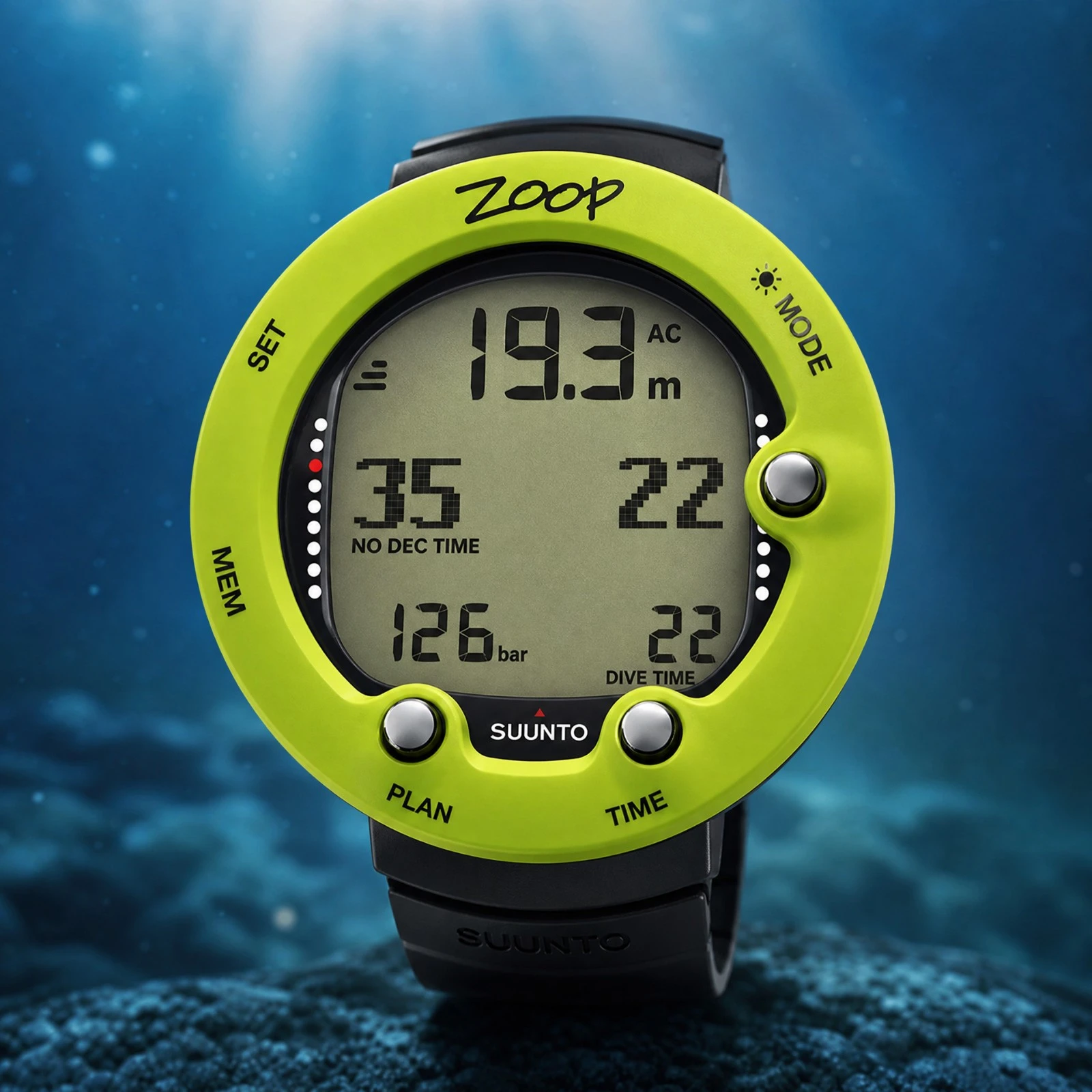
Complete review and test of the Suunto Zoop Novo, the entry-level dive computer par excellence. Analysis of its RGBM algorithm, LCD screen, and battery life.
To learn how to get the most out of your gear underwater, discover the AquaExposure Training.
1. Introduction
In the recreational diving world, it's impossible to ignore the Suunto Zoop Novo. Bulky, basic, and colorful, it's the standard computer used by thousands of clubs and schools around the world. However, a dive computer is more than just a depth calculator for beginners, it's the tool that manages the diver's decompression safety during each dive.
Faced with the colorful smartwatches that are flooding the market, what is the value of this large watch with an LCD screen underneath? Is its historical RGBM algorithm sufficient for a diver who wants to improve? This review strips away the "for beginners" label from the Zoop Novo and analyzes it thoroughly using our technical criteria.
2. The Verdict in Summary
Overall score: 2.9/5
| Criterion | Score | Meaning |
|---|---|---|
| Algorithm & decompression levels | 3.4/5 | Classic Suunto RGBM algorithm. Simple display but without advanced decompression control. |
| Air & multi-gas | 1.6/5 | Basic: Air and a single Nitrox gas up to 50%. No possibility of upgrading to Trimix. |
| Display & ergonomics | 3.1/5 | Segmented LCD screen. Very readable, but the four-button navigation can sometimes be tedious. |
| Battery life | 3.8/5 | User-replaceable CR2450 battery offering enormous battery life. |
| Connectivity & app | 2.8/5 | No Bluetooth. Synchronization only via a proprietary USB cable. |
| Compass & instruments | 3.0/5 | No digital compass, but includes a temperature sensor and an apnea mode. |
| Robustness & depth rating | 2.6/5 | Certified water resistance to 80 meters, but the acrylic screen is very sensitive to scratches. |
| Price & customer service | 4.1/5 | Around €200-€250, unbeatable. Suunto's customer service is readily available. |
This computer is ideal for: Occasional divers, newly certified divers, or clubs looking for durable and cost-effective equipment. This computer is not ideal for: Technical divers, enthusiasts who want a wireless mobile application, or those who need to monitor multiple decompression gases.
3. Block-by-block analysis
Algorithm & Safety Stops (3.4/5) The Zoop Novo relies on the very conservative Suunto RGBM (Reduced Gradient Bubble Model). Forget about free Gradient Factors, you can only adjust three levels of overall "conservatism." On the surface, this lacks transparency, but underwater, the information is presented very clearly: the safety stop, maximum depth, and ascent time are displayed in large numbers that are impossible to miss.
For more details Model: Suunto RGBM with continuous bubble algorithm. No GF settings available. Audible and visual alarms are present.
Air & Multi-Gas (1.6/5) This is a single-gas computer. It's perfect for air or basic Nitrox diving (programmable from 21% to 50% O2). However, it cannot handle gas switching during decompression stops, which will seriously limit divers aiming for advanced decompression training.
For more information Gases supported: Only one gas. Nitrox is limited to 50%. Trimix and CCR are completely unsupported.
Screen & Ergonomics (3.1/5) The display uses a large LCD matrix with black segments on a gray background. It's not aesthetically pleasing, but it's remarkably effective in bright sunlight. Underwater, the backlight activates via a button. The main drawback is the navigation system with its 4 buttons and sometimes convoluted menus, the interface feels outdated compared to current standards.
For more information Type: Matrix LCD (49 x 22 pixels) with an acrylic protective layer. No display customization options are available while diving.
Battery Life & Power (3.8/5) This is one of its major strengths. It uses a standard button cell battery, the CR2450, which you can buy anywhere in the world and replace yourself. The average battery life is estimated to be about a year and a half for 100 dives. No more worries about losing your USB charger on a cruise ship.
Further Details Battery type: User-replaceable CR2450. Low battery indicator displayed at startup.
Connectivity & App (2.8/5) The lack of a Bluetooth chip shows its age. To export your dive log and analyze your profiles (approximately 140 hours of data stored), you will need to obtain the proprietary Suunto USB cable, often sold for around fifty euros as an optional accessory, and use a desktop computer.
For more information Synchronization: USB only. No user-initiated firmware updates.
Compass & Instruments (3.0/5) You won't find an electronic compass in this unit. However, the Zoop Novo includes a reliable temperature sensor, a depth gauge mode, and, interestingly, a very good freediving mode that allows you to track your sessions within the 10-meter range.
For more information No compass. Modes: Air, Nitrox, Gauge, Freedive, Off.
Robustness & Depth (2.6/5) The composite frame is robust and can withstand the bumps and knocks of everyday use. It is certified for a maximum operating depth of 80 meters (EN 13319). However, the large acrylic screen protector is very susceptible to scratches, so we strongly recommend always keeping it in its protective soft case.
For more information Maximum depth: 80 m. Material: Acrylic and composite.
Price & Customer Service (4.1/5) The Suunto Zoop Novo is often offered between €200 and €250, which justifies its commercial longevity. At this price, you are buying a basic but reliable tool. The extensive Suunto distribution network allows you to find battery kits, replacement straps, or screen protectors in almost any dive shop worldwide.
To find out which battery to buy for this computer, check out our complete guide on batteries for dive computers. To learn how to replace the battery yourself step by step without risking damage, read our complete tutorial on how to change your own battery.
4. What you need to know before buying.
Certification Level: Designed specifically for Open Water, Level 1, or Level 2 Dive Buddy courses. Once you want to train in multi-gas decompression (Confirmed Nitrox), this device will no longer be suitable. Air Integration: Please note that this model has absolutely no air management system. It is impossible to connect a wireless pressure transmitter to it. Therefore, you must use it in conjunction with a mechanical pressure gauge connected to the first stage of your regulator. * Hidden Cost of the Cable: Be sure to check if the USB cable is included by your retailer. If you like to keep an accurate digital dive log, having to purchase the proprietary cable reduces the price competitiveness of the computer compared to entry-level competitor models that are equipped with Bluetooth.
5. Safety Reminder
Even though it is marketed as a "beginner" computer, such a device does not exempt you from understanding the theory of decompression. Safety always takes precedence over equipment. While the Zoop Novo calculates your obligations, it does not replace proper planning of your air reserve (using a pressure gauge), nor does it substitute for the procedures learned in case of a black screen underwater. It is always recommended, even for recreational diving, to have a backup method, such as a depth gauge and waterproof tables or a second computer, in case of equipment failure.
6. Our Verdict
The Suunto Zoop Novo is exactly what it claims to be: a workhorse. It doesn't stand out for its aesthetics or the innovation of its algorithm. But underwater, it does the job by displaying large, readable numbers.
For a first purchase of equipment, or for a recreational diver who only dives once or twice a year, this is an excellent investment that won't run out of battery the day before your trip. However, for a passionate diver who dives all year round, its lack of multi-gas capability and absence of Bluetooth will quickly make it obsolete in your equipment bag.
7. Frequently Asked Questions (FAQ)
Can I change the battery of my Suunto Zoop Novo myself? Yes, it uses a CR2450 battery that can be replaced by the user. This is a great advantage for being self-sufficient during trips.
Does the Suunto Zoop Novo have an air integration feature? No, this entry-level model is not compatible with wireless or wired transmitters. It requires the exclusive use of a traditional mechanical pressure gauge.
Is it possible to adjust the gradient factors on the Zoop Novo? No, it uses the standard Suunto RGBM algorithm, which does not allow for adjustment of the gradient factors. You can only increase its overall conservatism through predefined settings.
What cable is needed to synchronize the Zoop Novo? It requires a proprietary USB cable from Suunto to connect to a desktop computer. Unfortunately, this cable is often sold separately.
8. Train yourself to go further.
Even the most basic algorithm in the world needs to be understood in order to dive intelligently. Enhance your mastery of decompression tools with our online learning modules through the AquaExposure Training.
© 2026 AquaExposure. All rights reserved. Reproduction prohibited without authorization.
Share
Table of Contents
- 011. Introduction
- 022. The Verdict in Summary
- 033. Block-by-block analysis
- 04Algorithm & Safety Stops (3.4/5) The Zoop Novo relies on the very conservative Suunto RGBM (Reduced Gradient Bubble Model). Forget about free Gradient Factors, you can only adjust three levels of overall "conservatism." On the surface, this lacks transparency, but underwater, the information is presented very clearly: the safety stop, maximum depth, and ascent time are displayed in large numbers that are impossible to miss.
- 05For more details Model: Suunto RGBM with continuous bubble algorithm. No GF settings available. Audible and visual alarms are present.
- 06Air & Multi-Gas (1.6/5) This is a single-gas computer. It's perfect for air or basic Nitrox diving (programmable from 21% to 50% O2). However, it cannot handle gas switching during decompression stops, which will seriously limit divers aiming for advanced decompression training.
- 07For more information Gases supported: Only one gas. Nitrox is limited to 50%. Trimix and CCR are completely unsupported.
- 08Screen & Ergonomics (3.1/5) The display uses a large LCD matrix with black segments on a gray background. It's not aesthetically pleasing, but it's remarkably effective in bright sunlight. Underwater, the backlight activates via a button. The main drawback is the navigation system with its 4 buttons and sometimes convoluted menus, the interface feels outdated compared to current standards.
- 09For more information Type: Matrix LCD (49 x 22 pixels) with an acrylic protective layer. No display customization options are available while diving.
- 10Battery Life & Power (3.8/5) This is one of its major strengths. It uses a standard button cell battery, the CR2450, which you can buy anywhere in the world and replace yourself. The average battery life is estimated to be about a year and a half for 100 dives. No more worries about losing your USB charger on a cruise ship.
- 11Further Details Battery type: User-replaceable CR2450. Low battery indicator displayed at startup.
- 12Connectivity & App (2.8/5) The lack of a Bluetooth chip shows its age. To export your dive log and analyze your profiles (approximately 140 hours of data stored), you will need to obtain the proprietary Suunto USB cable, often sold for around fifty euros as an optional accessory, and use a desktop computer.
- 13For more information Synchronization: USB only. No user-initiated firmware updates.
- 14Compass & Instruments (3.0/5) You won't find an electronic compass in this unit. However, the Zoop Novo includes a reliable temperature sensor, a depth gauge mode, and, interestingly, a very good freediving mode that allows you to track your sessions within the 10-meter range.
- 15For more information No compass. Modes: Air, Nitrox, Gauge, Freedive, Off.
- 16Robustness & Depth (2.6/5) The composite frame is robust and can withstand the bumps and knocks of everyday use. It is certified for a maximum operating depth of 80 meters (EN 13319). However, the large acrylic screen protector is very susceptible to scratches, so we strongly recommend always keeping it in its protective soft case.
- 17For more information Maximum depth: 80 m. Material: Acrylic and composite.
- 18Price & Customer Service (4.1/5) The Suunto Zoop Novo is often offered between €200 and €250, which justifies its commercial longevity. At this price, you are buying a basic but reliable tool. The extensive Suunto distribution network allows you to find battery kits, replacement straps, or screen protectors in almost any dive shop worldwide.
- 194. What you need to know before buying.
- 205. Safety Reminder
- 216. Our Verdict
- 227. Frequently Asked Questions (FAQ)
- 238. Train yourself to go further.
Questions about the Journal
Can I use the photographs from this journal?
All images are protected by copyright. For any commercial or editorial use, please contact us via our form.
How can I be notified of new articles?
Follow us on social media or join the Sentinels Circle to receive our immersion stories before anyone else.
Do you offer hands-on workshops?
Yes, we organize masterclasses and field expeditions for members of our school. Check the Training page for details.


