Topaz Photo AI denoises and recovers detail on underwater photos. Where AI truly helps, where it invents, and the line not to cross.
There is a question almost all my students ask me sooner or later, often in a low voice as if it were a confession. "Benjamin, am I allowed to use AI on my photos?" And behind that question there is another, deeper one: at what point is it no longer my photo?
With the arrival of Topaz Photo AI and its first noticed results on underwater images, this question deserves a real answer. Not a soft yes, not a preachy no. A clear line.
No. Topaz Photo AI reduces noise and recovers detail on an image that is already decent. It does not rebuild a missed focus or a badly exposed scene. It is a finishing tool, not a rescue tool.
Topaz Photo AI brings denoising, sharpening and upscaling into a single app, where DeNoise focused on noise. For high-ISO underwater photography, this unification simplifies the workflow.
Sometimes. On very noisy or blurry areas, the AI can invent a texture that was never there. That is acceptable on a background, far less so on the main subject. The photographer must keep control and check at one hundred percent.
Topaz brought into a single app what used to be split across several tools: noise reduction, sharpening and upscaling. You load an image, the AI analyses it, and offers a denoised, re-detailed version.
For underwater photography, this is far from trivial. Underwater, light is scarce. To freeze a subject, you raise the ISO, and digital noise sets in. It is a permanent trade-off that every underwater photographer knows. A tool that removes that noise while keeping fine detail therefore answers a real field problem, not a whim.
I had already placed Topaz in my overview of AI tools for underwater photography in 2026. Here I want to go further on a single point: the line between revealing and inventing.
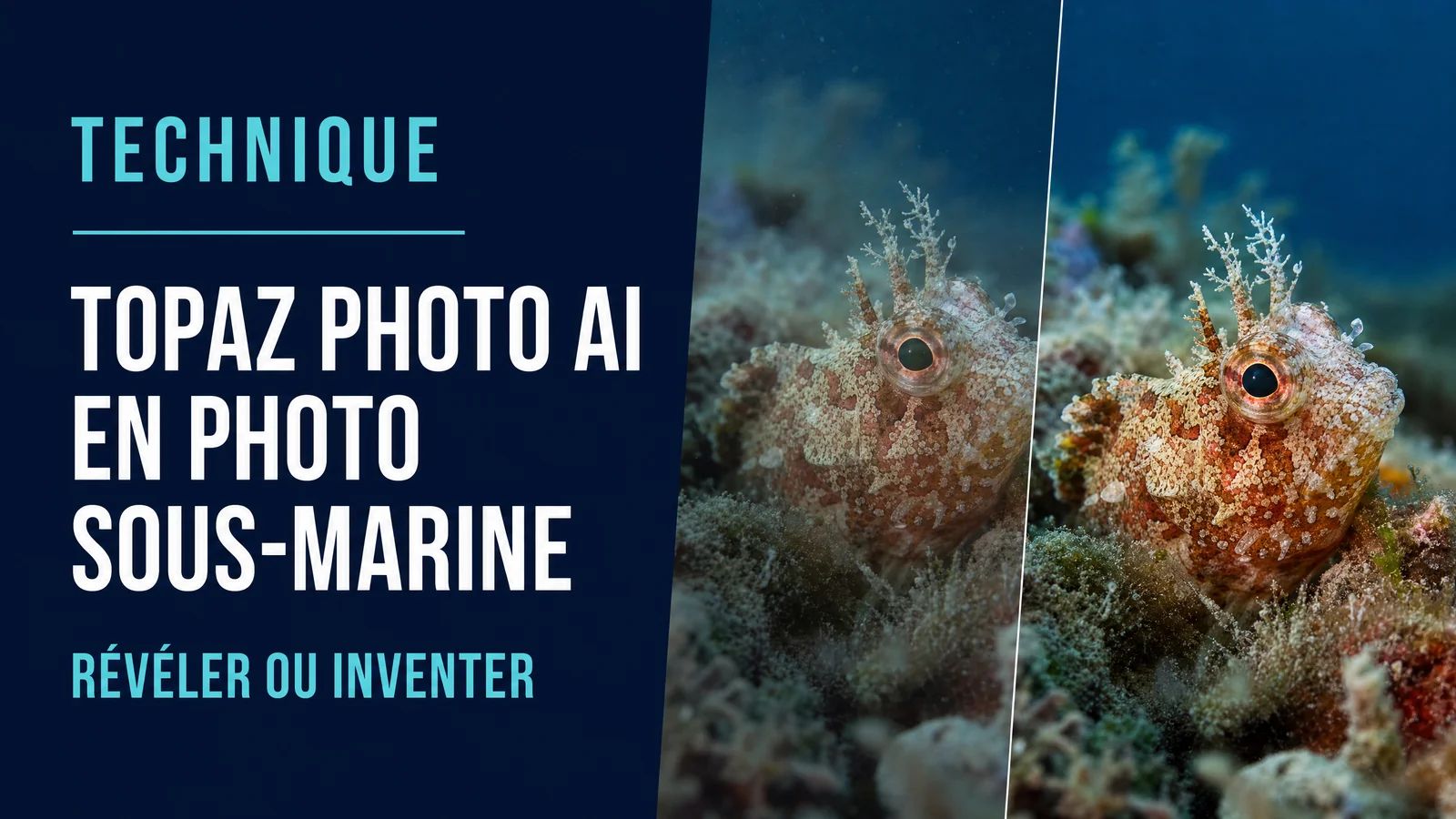
Visual direction: before and after diptych on the same high-ISO underwater image. On the left visible noise, on the right the cleaned result. Sharp subject, lightly textured background.
Let us be fair to the tool. In several situations, Topaz Photo AI saves precious time and genuinely improves the result.
High-ISO noise first. This is its home turf. An image shot at 3200 ISO in dark water comes out cleaner, with more readable colours and controlled grain. The difference is clear, above all on dark flats where noise shows the most.
Micro-detail recovery next. On an image that is already sharp but a bit soft, the tool can give bite back to textures, a fish's scales, a nudibranch's rhinophores, a coral's structures. The key word here is already sharp. The AI sharpens what exists, it does not create a sharpness that is absent.
Upscaling, finally. To print an image large or to crop heavily, AI resolution increase gives better results than classic methods.
Now the part that tool sellers do not like to put forward.
On very noisy or truly blurry areas, the AI does not recover detail. It invents it. It fills the void with a plausible but false texture. On a distant background, nobody will complain. On the main subject, that is a problem.
I have seen images where a fish's eye, pushed too hard, came out with a perfect structure that the sensor had never captured. The photo was prettier. It was also a little dishonest. And an underwater photo that lies, even a little, loses what makes it valuable: the fact that it bears witness to a real moment, lived, underwater.
That is why I never hand control to the tool. I always check at one hundred percent, on the subject, what the AI has done. If it invented, I lower the intensity until I get back to the truth.
Visual direction: software interface, intensity slider set to a moderate level, preview of a marine subject. Show that the human keeps the hand.
At AquaExposure, post-processing has a single mission: reveal what your eyes saw and what the sensor struggled to render. Not fabricate a scene that never existed. That is the whole point of my article on the art of revealing without betraying in underwater editing.
This line splits two uses of Topaz Photo AI. On one side, you clean the noise to find the real scene again, you recover a detail that the light of the moment had blurred. That is revealing. On the other, you let the AI rebuild a subject it never saw, you generate matter. That is inventing.
The first belongs to photography. The second belongs to something else, which has its place elsewhere, but which is no longer quite your photo. It is also the debate running through the AI rules of underwater photo competitions in 2026, and the same caution I apply to generative fill tools, as I explain for Adobe Generative Fill in underwater photography.
A good tool in the wrong place gives bad results. Here is the order I teach.
You start with culling and base adjustments in a catalogue software: exposure, white balance, contrast. You first understand why the colours fled, which I detail in the article on colour correction in post-processing. Only then comes denoising with Topaz Photo AI, on an image that is already framed and correctly exposed. You finish with fine adjustments and any upscaling.
So Topaz is not the first step. It is a finishing step. Placing it too early means asking the AI to guess on an unstable base. Placing it at the right moment means giving it a healthy image to bring out.
And there is a corollary I keep repeating: the best noise reduction is the one you do not need. An image captured with good technique, at the right depth, in natural light well read, arrives in post-processing with little noise. The AI then only polishes. That is exactly what I work on with my students in the shooting exercises.
Yes, as long as you know what you are asking of it. Topaz Photo AI is an excellent finishing tool for underwater photography, in particular to tame high-ISO noise. It becomes dangerous the day you hand it the main subject hoping for a miracle.
Keep the hand. Check the subject. Lower the intensity as soon as the tool starts to invent. And remember that the photo that will move you in ten years is not the one the AI rebuilt, it is the one you managed to capture.
If you want to build an honest post-processing workflow, from culling to finishing, that is exactly what the AquaExposure training cover.


